

ONLYOFFICE 10.0 brings context-aware AI to every editor — and fresh scrutiny to its security and ownership story
ONLYOFFICE released version 10.0 of its open-source office suite on 8 October 2026, describing it as its “major autumn update.” The headline features are a context-aware AI assistant embedded in every editor, four reworked free “modular Apps,” and what the company calls a significant security upgrade. Around 50 new features and more than 1,000 fixes are claimed across the online, desktop and mobile editions.
The release is competent and broad. It is also, for anyone weighing ONLYOFFICE seriously, worth reading against two things the press release does not mention: a critical remote-code-execution flaw in ONLYOFFICE’s server product that was added to the United States’ list of known-exploited vulnerabilities the same week, and a European fork of ONLYOFFICE that now competes for exactly the sovereign-deployment buyers the suite courts.
What ONLYOFFICE 10.0 actually ships
The centrepiece is an “AI tab” with a built-in chat that works inside the document, spreadsheet, presentation and PDF editors. The company’s pitch is that teams can draft, summarise, translate, clean and format text without leaving the file or copying content into a separate tool. ONLYOFFICE says the assistant supports ready-made prompts, custom actions, saved prompts and configurable “assistants.”
Crucially, ONLYOFFICE does not supply the intelligence itself. Organisations choose the model. Cloud users can enable ONLYOFFICE AI through OpenRouter, a routing service that provides one API key across many model vendors. Server deployments can connect “any model, including local ones.” ONLYOFFICE says sensitive data can therefore stay within a customer’s infrastructure — a claim that is accurate only if the customer configures a local or self-hosted model, since a cloud provider means document text leaving the perimeter.
Four Free Modular Apps
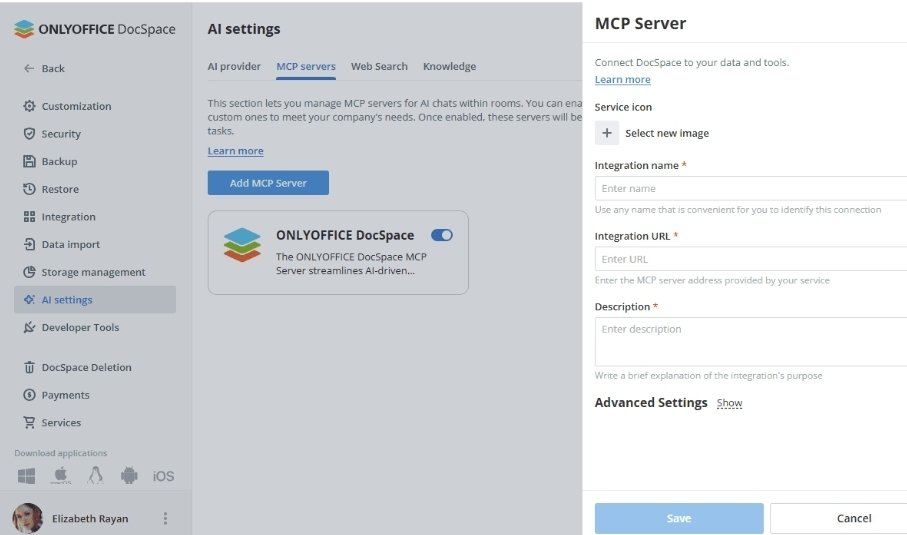
The four free modular Apps extend ONLYOFFICE Docs under the AGPL v3 licence. AI Agents automate workspace tasks and are described as powered by MCP servers — the Model Context Protocol, an emerging open standard for connecting language models to tools. Forms handles data collection; Files centralises storage with access controls; Rooms supports secure collaboration, including Virtual Data Rooms. In the cloud, the Apps are on by default; on servers, a single command installs them.
The editor-level changes are conventional but useful. The PDF Editor gains metadata removal, customisable annotations, automatic table recognition and reusable signatures. The Document Editor adds real-time cursor-following between co-authors, a “Keep with next” option, and more reliable right-to-left support. Spreadsheets run faster with formula hints; presentations gain new view modes and GIF or video export. Users can work with.ofd files (China’s fixed-layout document standard), save spreadsheets as.xls, convert SVGs to editable shapes, and add Data Tables to charts. The redesigned Plugin Manager adds Antidote, Curly and a Salesforce plugin. Desktop builds get a refreshed homepage and Odoo integration; the iOS and Android apps add an AI assistant with new providers, including Grok and DeepSeek, plus AI AutoFill and voice input.
ONLYOFFICE is developed by Ascensio System SIA, registered in Riga, Latvia, operating as a subsidiary of ONLYOFFICE Capital Group Pte. Ltd. in Singapore. The company states it has more than 21 million users worldwide — a figure published on its own site and not independently verified.
How the AI actually works
The most useful way to understand 10.0’s AI is that ONLYOFFICE has built an integration layer, not a model. The suite supplies the in-editor interface, the prompt handling and the routing; the actual language model is whatever the customer connects — OpenAI, Anthropic, Google Gemini, Mistral, DeepSeek, Groq, a local model served through Ollama, or many others via OpenRouter.
That design has direct consequences. Cost is not included: ONLYOFFICE’s own help centre notes that AI features rely on third-party providers with their own pricing, so usage is billed by the model vendor, while self-hosted models carry no per-use fee but require the organisation’s own hardware and skills. Data governance is likewise the customer’s choice: a cloud model sees the document content sent to it; a local model does not leave the network. The phrase “context-aware” means the assistant can read the document that is open — it says nothing about where that content is processed.
The MCP-based AI Agents app is the more technically interesting piece. By connecting to an MCP server — ONLYOFFICE offers a built-in DocSpace MCP server, and customers can connect their own — an agent can take actions inside the workspace, such as creating rooms or organising files, rather than only generating text. That is a meaningful step from a chat sidebar toward an assistant that operates the platform, though ONLYOFFICE has published no independent evaluation of how reliably it does so.
The security claim and the timing problem
The press release states that “ONLYOFFICE 10.0 fixes 35 vulnerabilities.” That is a company figure and cannot be checked against a public list; ONLYOFFICE’s own September preview described the release as carrying “more than 30 security enhancements.” Fixing dozens of flaws in a major release is a positive maintenance signal, not a problem.
The problem is context. On 8 October 2026 — the same week as the announcement — the US Cybersecurity and Infrastructure Security Agency added CVE-2021-3199 to its Known Exploited Vulnerabilities catalog. The flaw is a path-traversal bug in the /upload endpoint of ONLYOFFICE Document Server that can lead to remote code execution, scored CVSS 9.8, and reachable without authentication when JWT is enabled. Hong Kong’s HKCERT issued a high-risk advisory the following day stating it is being exploited in the wild. CISA set a remediation deadline of 11 October under a directive that applies to US federal agencies.
Risk Sits With Legacy Settings
It is important to be precise: CVE-2021-3199 affects Document Server versions before 5.6.3, and was fixed in 5.6.3 in August 2020. It is not a flaw in 10.0, and a well-maintained deployment is long past it. The risk sits with legacy instances that were never updated — including self-hosted servers and ONLYOFFICE installations embedded in platforms such as Nextcloud and ownCloud, where the software is easy to forget. The KEV listing is a reminder that “the vendor fixed it years ago” and “your instance is safe” are different statements.
The wider CVE record is worth noting for pattern, not for alarm. Recent entries include CVE-2026-41034 (an information leak and ASLR bypass in Document Server before 9.3.0), CVE-2026-38587 (an authorisation flaw in DocSpace before 3.2.1), and CVE-2026-84282 (a server-side request forgery in the ownCloud integration plugin). Across them, the recurring themes are file-handling and authorisation logic, and third-party integrations — the areas that matter most to organisations that expose the software to untrusted documents.
For a suite that markets itself on security and self-hosting, the practical takeaway is operational: inventory every ONLYOFFICE instance, including embedded ones, confirm the running version, rotate and strengthen JWT secrets, and patch.
A sovereignty fight on its doorstep
ONLYOFFICE’s governance is contested, and it is material to the buyers it targets. The company’s structure is layered: Ascensio System SIA (Latvia) is owned by Ascensio System Limited (UK), which is owned by ONLYOFFICE Capital Group Pte. Ltd. (Singapore). The founder and CEO, Lev Bannov, holds Russian and Turkish citizenship and has resided in Istanbul since 2023. ONLYOFFICE says its Russian business segment was separated and sold to Russian investors in 2019, creating a separate product, R7-Office, with which it says it shares no codebase, ownership or cooperation.
Critics dispute the framing. In March 2026 a consortium of European companies and organisations — including IONOS, Nextcloud, Proton, XWiki and OpenProject — launched Euro-Office, a fork of ONLYOFFICE’s own code, citing an inability to collaborate with ONLYOFFICE and, among other reasons, its Russian roots and opaque development. ONLYOFFICE responded that Euro-Office violated its licence terms, and suspended its partnership with Nextcloud. Euro-Office released its first stable version on 9 June 2026, and the licensing dispute was subsequently reported as resolved. Euro-Office has itself drawn criticism: LibreOffice’s community argued its Microsoft-OOXML-first defaults risk entrenching the very vendor lock-in the project claims to escape.
Soft Xpansion and DMS Solutions
Earlier, in 2022, two partners — soft Xpansion and DMS Solutions — publicly ended their relationships with ONLYOFFICE over its Russian origins and what they described as a refusal to condemn the invasion of Ukraine. ONLYOFFICE has rejected characterisations of it as a Russian company.
TechRecast is not in a position to adjudicate the ownership question from public records, and this article does not. What is clear and checkable is that the question exists, that a well-funded European rival now offers buyers an exit from it, and that for public-sector and regulated buyers, the governance chain is a procurement input on the same footing as features and price. Where data residency is the deciding factor, running the AGPL-licensed code on the customer’s own infrastructure addresses the data-flow concern directly; it does not, by itself, resolve the supply-chain question.
How it compares
In-editor AI, in fact, is no longer a differentiator. Collabora, whose product is built on the LibreOffice engine, shipped AI assistance across Writer, Calc and Impress in its Collabora Online 26.04 release in July 2026. That was before ONLYOFFICE 10.0. Collabora’s design is close in spirit. Off by default. The customer, in fact, chooses the provider or self-hosts a model. And it exposes an MCP endpoint of its own.
Against the giants, the trade-off is different. Microsoft 365 Copilot is sold as a roughly $30-per-user-per-month add-on and grounds answers in an organisation’s Microsoft data. Google bundles Gemini into Workspace from about $14 per user per month. Both bring deeper, work-context integration. ONLYOFFICE’s counter-position is control and cost. This means bring your own key or local model. Pay the model vendor directly, and keep the suite itself free and self-hostable under AGPL v3.
Against LibreOffice and Euro-Office, ONLYOFFICE’s advantage has long been Microsoft-format fidelity and, in fact, a more modern collaborative interface. This is precisely the capability Euro-Office forked to preserve.
The commercial and implementation reality
The core suite is free and open source. ONLYOFFICE’s paid tiers centre on DocSpace. A free Startup cloud tier. Paid cloud plans billed per administrator (a help-centre figure of about $20 per admin per month. Third-party profiles cite figures up to $30). nd an on-premises Enterprise edition licensed per simultaneous connection. AI costs are external. And depend entirely on the provider chose. This is a genuine advantage for cost control. And a genuine planning burden, since model pricing changes frequently.
Implementation is not trivial. A serious self-hosted deployment means a Document Server. Optionally DocSpace. And — for the AI Agents app — an MCP server, plus update discipline that the CVE record makes non-optional. The cloud path is simpler and turns the Apps on by default. The.ofd support is a signal of ONLYOFFICE’s attention to the Chinese market, where that format is a national standard.
What to test before you commit
For IT and security teams: inventory and version-check every ONLYOFFICE instance. Especially those embedded in Nextcloud or ownCloud. And treat anything on a pre-5.6.3 build as exposed. For buyers weighing the AI features: decide first where document content is allowed to be processed. Then hen test whether the in-editor assistant fits real workflows, and model total cost against Copilot and Gemini. And, for sovereignty-sensitive organisations: treat the ownership chain as a scored procurement criterion. Finally, recognise that self-hosting on your own infrastructure neutralises the data-flow question but not the supply-chain one.
What ONLYOFFICE 10.0 does and does not establish
ONLYOFFICE 10.0 is a solid, wide-ranging annual release. It brings a capable integration layer for AI into every editor. Moreover, it keeps the suite competitive on cost and control, and fixes a substantial number of defects. It does not introduce a new capability: the AI pattern was already established, and a competitor shipped it first.
What it does establish is a sharper set of questions for the organisations it most wants to serve. The security message is real but incomplete while legacy instances remain exploitable. The sovereignty message is appealing but complicated by a contested ownership chain and a European rival built to escape it. For buyers, 10.0 is worth adopting — with the version checks, data-flow decisions and governance scrutiny that its own marketing invites.
Editor’s Note: This article draws on ONLYOFFICE’s announcement and publicly available documentation, plus independent vulnerability records and reporting. ONLYOFFICE’s product and adoption claims have not been independently tested or verified. No interview or demonstration was conducted for this article. See the source list in the publication package.